
本文以 OS: Debian, Shell: bash 为环境写成,其它环境如 OS: RedHat; Shell: sh, zsh 可能与本文结论有所出入。
Shell环境配置加载分析
在研究shell环境配置文件加载流程前,需要先搞明白 Interactive Shell、Login Shell 的概念。
Interactive Shell
定义
man 说明如下:
1
bash [options] [command_string | file]
1
2
3
An interactive shell is one started without non-option arguments (unless -s is
specified) and without the -c option, whose standard input and error are both connected
to terminals (as determined by isatty(3)), or one started with the -i option.
以下条件满足任意一条,即为 Interactive Shell:
- 启动时,既没有指定非选项参数(除非指定
-s)也没有指定-c选项,且标准输入和错误输出都与终端相连。 - 启动时,指定了
-i选项。
换言之:
- 没有
-c,没有-s,没有非选项参数,且标准输入和错误输出都与终端相连,为Interactive Shell。 - 没有
-c,有-s,且标准输入和错误输出都与终端相连,为Interactive Shell。 - 有
-i选项,为Interactive Shell。
感性认识:你敲命令,shell给你回显结果,像这样与人交互的shell就是 Interactive Shell。
判定
man 说明如下:
1
2
PS1 is set and $- includes i if bash is interactive, allowing a shell script or a
startup file to test this state.
以下条件满足任意一条,即为 Interactive Shell:
$PS1不为空。$-中包含字母i。
比如:
ssh 远程登录后,其 shell 是 Interactive Shell:
1
2
3
4
5
orangepi@opidebz3server:~$ echo $PS1
\[\e]0;\u@\h: \w\a\]${debian_chroot:+($debian_chroot)}\[\033[01;32m\]\u@\h\[\033[00m\]:\[\033[01;34m\]\w\[\033[00m\]\$

orangepi@opidebz3server:~$ echo $-
himBHs
摘自 /etc/bash.bashrc 和 ~/.bashrc 中的判定写法:
1
2
3
4
5
6
7
8
9
10
# /etc/bash.bashrc
# If not running interactively, don't do anything
[ -z "$PS1" ] && return

# ~/.bashrc
# If not running interactively, don't do anything
case $- in
    *i*) ;;
      *) return;;
esac
Login Shell
定义
man 说明如下:
1
2
A login shell is one whose first character of argument zero is a -, or one started with
the --login option.
以下条件满足任意一条,即为 Login Shell:
$0的首字符是-。- 启动时,指定了
--login(-l)选项。
感性认识:输入密码登录后启动的shell就是 Login Shell。
判定
判定方法与定义相同。需要注意的是,实测中发现,指定了 --login(-l) 选项的shell,其 $0 的首字符并不是 -。这意味着上述两个条件分别是 Login Shell 的充分不必要条件。若是 Login Shell,$0 的首字符并不总是 -。另外,已然登录系统后,在尝试 bash -c "echo $0" 时,输出竟然是 -bash,但这显然是一个 Non-Interactive Non-Login Shell。综上,依据定义来判定 Login Shell 并不十分可靠。
DeepSeek给出了一个号称可靠的检测方法:shopt -q login_shell && echo "1" || echo "0",实测中暂未发现问题,也许能够作为 Login Shell 的充要条件。
比如:
ssh远程登录后,其shell是 Login Shell:
1
2
3
4
5
orangepi@opidebz3server:~$ echo $0
-bash

orangepi@opidebz3server:~$ shopt -q login_shell && echo "1" || echo "0"
1
启动一个指定了 --login 参数的subshell,按照定义,其shell是 Login Shell:
1
2
3
4
5
6
7
orangepi@opidebz3server:~/Me/Misc$ bash --login

orangepi@opidebz3server:~/Me/Misc$ echo $0
bash

orangepi@opidebz3server:~$ shopt -q login_shell && echo "1" || echo "0"
1
登录系统后,使用 bash -c 执行命令,其shell是 Non-Login Shell:
1
2
3
4
5
orangepi@opidebz3server:~$ bash -c "echo $0"
-bash

orangepi@opidebz3server:~$ bash -c 'shopt -q login_shell && echo "1" || echo "0"'
0
Shell类型举例
(有些参数、配置是可以调的,以下只是一般情况。)
source ~/.bashrc相当于在当前shell中一行行执行了指定的文件,根本不会启动新shell。- 启动一个没有GUI的系统,在控制台登录后进入的shell,是
Interactive Login Shell。 - ssh命令行远程登录后启动的shell是
Interactive Login Shell。 su - user启动的shell是Interactive Login Shell。- 在shell中手敲bash打开的subshell是
Interactive Non-Login Shell。 - 在具备GUI的系统中,登录后进入桌面,手动打开终端,此时启动的shell一般是
Interacive Non-Login Shell。这是因为桌面进程本身可能在一个Login Shell中启动,登录后进入桌面再启动的shell是其后代进程,一般不会再是Login Shell。 su user启动的shell是Interacive Non-Login Shell。- 登录后,桌面进程可能是在一个由程序启动的shell中启动,我推测这个由程序启动并登录的shell是
Non-Interactive Login Shell。 - 像
bash --login test.sh这样启动的shell,它不与人交互,又指定了--login,显然是Non-Interactive Login Shell。 - 像
bash test.sh或./test.sh这样启动的shell,它不与人交互,执行脚本的时候显然已经登录了系统,所以是Non-Interactive Non-Login Shell。 - 无论crontab执行的是系统级还是用户级定时任务,它都不需要登录,其执行shell脚本时启动的shell都是
Non-Interactive Non-Login Shell。 - 由程序内部启动的shell,如果没有指定特殊参数,多数情况下都是
Non-Interactive Non-Login Shell。
启动文件加载分析
加载流程
1
2
3
4
5
6
7
8
9
10
11
12
13
14
15
16
17
18
19
20
21
22
23
# Interactive Login Shell
/etc/profile
  └/etc/bash.bashrc
  └/etc/profile.d/*.sh
~/.profile
  └~/.bashrc
~/.bash_logout
/etc/bash.bash_logout

# Interactive Non-Login Shell
/etc/bash.bashrc
~/.bashrc

# Non-Interactive Login Shell
/etc/profile
  └/etc/profile.d/*.sh
~/.profile
  └~/.bashrc(do nothing and return)
~/.bash_logout
/etc/bash.bash_logout

# Non-Interactive Non-Login Shell
$BASH_ENV
-> └ 表示调用关系。这些调用关系并不绝对,不同环境可能会有不同情况,应以实际脚本内容为准,不过通常是上述情况。
-> 在有些Linux中(非Debian),/etc/bash.bashrc 可能叫做 /etc/bashrc,/etc/bash.bash_logout 可能叫做 /etc/bash_logout。
-> 笔者没有在实验环境中新建 ~/.bash_profile、~/.bash_login 文件,只有默认存在的 ~/.profile 文件。若上述文件存在,应该会按照 ~/.bash_profile > ~/.bash_login > ~/.profile 的优先级顺序仅加载存在且可读的第一个文件。这三个文件通常都会 . "$HOME/.bashrc"。
-> Interactive Login Shell 退出(比如 Ctrl+D)或 Non-Interactive Login Shell 执行 exit 命令时,bash才会加载 logout 文件,直接关闭bash则不会加载之。
-> /etc/profile 摘录如下:
1
2
3
4
5
6
7
8
9
10
11
12
13
14
15
if [ "${PS1-}" ]; then
  if [ "${BASH-}" ] && [ "$BASH" != "/bin/sh" ]; then
    # The file bash.bashrc already sets the default PS1.
    # PS1='\h:\w\$ '
    if [ -f /etc/bash.bashrc ]; then
      . /etc/bash.bashrc
    fi
  else
    if [ "$(id -u)" -eq 0 ]; then
      PS1='# '
    else
      PS1='$ '
    fi
  fi
fi
if [ "${PS1-}" ] 是在判断是否是 Interactive Shell,所以 Non-Interactive Login Shell 不会加载 /etc/bash.bashrc。
-> ~/.profile 摘录如下:
1
2
3
4
5
6
7
# if running bash
if [ -n "$BASH_VERSION" ]; then
    # include .bashrc if it exists
    if [ -f "$HOME/.bashrc" ]; then
        . "$HOME/.bashrc"
    fi
fi
~/.bashrc 摘录如下:
1
2
3
4
5
# If not running interactively, don't do anything
case $- in
    *i*) ;;
    *) return;;
esac
~/.profile 中加载了 ~/.bashrc,但若不是 Interactive Shell,~/.bashrc 将直接返回,所以 Non-Interactive Login Shell 虽然读了 ~/.bashrc 文件,但其实相当于没有加载它。
-> 环境变量 BASH_ENV 的值是一个文件名,Non-Interactive Non-Login Shell 会加载这个文件。
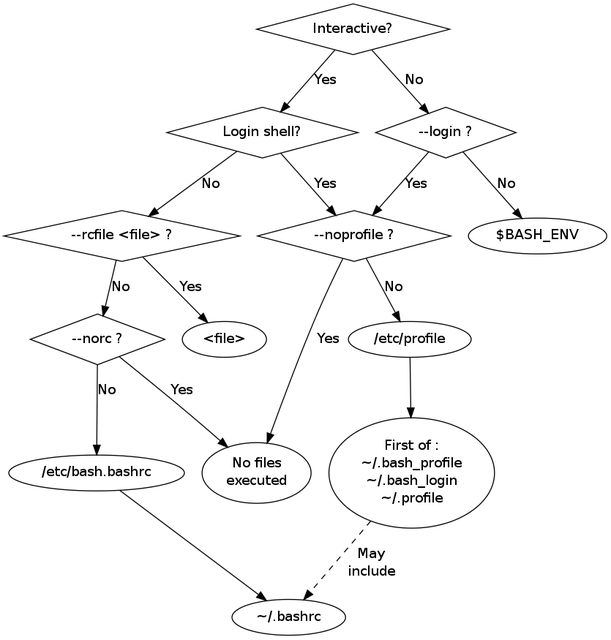
我们可以简单记忆:如果是 Login Shell,则会加载 /etc/profile、first of ~/.bash_profile > ~/.bash_login > ~/.profile;如果是 Interactive Shell,则会加载 /etc/bash.bashrc、~/.bashrc。
详细文档可参考Bash Reference Manual - 6.2 Bash Startup Files。
另附一张国外大佬整理的图片:
特别分析下sudo
笔者在各个启动文件和测试文件中都添加了一些测试输出,这些输出被重定向到一个特定文件中以便查看。我们将在bash中手敲一些sudo命令,并结合记录下的测试输出内容进行分析。
提前准备
启动文件的测试输出:略。
logout 文件:略。
新建 /root/.profile 文件(一般/root下没有该文件),并调用 /root/.bashrc:
1
2
3
4
5
6
7
8
9
echo "$HOME/.profile" >> /home/orangepi/Me/Misc/load_cfg

# if running bash
if [ -n "$BASH_VERSION" ]; then
    # include .bashrc if it exists
    if [ -f "$HOME/.bashrc" ]; then
        . "$HOME/.bashrc"
    fi
fi
设置 BASH_ENV 环境变量:
1
2
# 直接在bash里手敲
export BASH_ENV=/home/orangepi/Me/Misc/test1.sh
test1.sh 内容:
1
2
3
4
#!/bin/bash

echo 'test1.sh' >> /home/orangepi/Me/Misc/load_cfg
echo '$BASH_ENV' >> /home/orangepi/Me/Misc/load_cfg
test.sh 内容:
1
2
3
4
5
6
7
8
#!/bin/bash

echo "test.sh" >> /home/orangepi/Me/Misc/load_cfg
echo "\$BASH_ENV: $BASH_ENV" >> /home/orangepi/Me/Misc/load_cfg
pstree >> /home/orangepi/Me/Misc/load_cfg
echo "" >> /home/orangepi/Me/Misc/load_cfg
echo "123" > /dev/null
exit
分析sudo
> sudo pwd
没有测试输出内容。
启动 sudo 进程,再启动 pwd 子进程。pwd 是一个二进制可执行程序,不是shell脚本。没有shell被启动,所以没有测试输出内容。
> sudo ./test.sh
1
2
3
test.sh
$BASH_ENV:
...
启动 sudo 进程,发现要执行一个shell脚本,于是根据 shebang 启动了一个 bash 子进程,自然是 Non-Interactive Non-Login Shell,于是应该要先加载环境变量 BASH_ENV 指定的文件 test1.sh,然而输出结果是“并没有”且能注意到 BASH_ENV 的值是空的,这是因为 sudo 在默认配置下会重置并保持一个特定的环境,使用 sudo env 可以查看之。bash 启动时发现没有 BASH_ENV,自然就不会加载其指定的文件。
> sudo –preserve-env=BASH_ENV pwd
没有测试输出内容。
--preserve-env=BASH_ENV 使环境变量 BASH_ENV 保留了下来,但 pwd 不是shell脚本,没有shell被启动,所以没有测试输出内容。
> sudo –preserve-env=BASH_ENV ./test.sh
1
2
3
4
5
test1.sh
$BASH_ENV
test.sh
$BASH_ENV: /home/orangepi/Me/Misc/test1.sh
...
--preserve-env=BASH_ENV 使环境变量 BASH_ENV 保留了下来,执行 test.sh 时启动了一个 Non-Interactive Non-Login Shell,所以 BASH_ENV 指定的文件 test1.sh 被加载了。
> sudo -i
1
2
3
4
5
/etc/profile
/etc/bash.bashrc
/etc/profile.d/*.sh
/root/.profile
/root/.bashrc
启动 sudo 进程后还会启动一个shell子进程。-i 表明会启动一个 Login Shell,又因为没有指定要执行的命令,启动的shell将是一个 Interactive Shell,即启动的shell子进程是一个 Interactive Login Shell。测试输出符合预期。若是手动 Ctrl+D 退出shell,在文件存在的情况下,还会依次加载 /root/.bash_logout、/etc/bash.bash_logout。
> sudo -i –preserve-env=BASH_ENV pwd
1
2
3
4
5
6
/etc/profile
/etc/profile.d/*.sh
/root/.profile
/root/.bashrc(do nothing and return)
test1.sh
$BASH_ENV
居然加载了BASH_ENV,令人意外的结果。
首先启动 sudo 进程。其次,由于 -i 且指定了要执行的命令,所以启动一个 Non-Interactive Login Shell。接下来就令人意外了,根据 man sudo 的说法,我猜应该是相当于执行了 bash -c 'command',即启动了一个 Non-Interactive Non-Login Shell 去执行了 pwd。
man sudo:
1
2
3
4
5
-i, --login
...
If a command is specified, it is passed to the shell as a simple command
using the -c option.
...
由于保留了 BASH_ENV,所以 test1.sh 被加载。
命令执行完毕后,logout 文件不会被加载,应该是其内部没有正常 exit Login Shell。
> sudo -i –preserve-env=BASH_ENV /home/orangepi/Me/Misc/test.sh
1
2
3
4
5
6
7
8
9
10
11
/etc/profile
/etc/profile.d/*.sh
/root/.profile
/root/.bashrc(do nothing and return)
test1.sh
$BASH_ENV
test1.sh
$BASH_ENV
test.sh
$BASH_ENV: /home/orangepi/Me/Misc/test1.sh
...
这里
test.sh使用绝对路径是因为sudo -i会将当前路径调整为/root。
首先启动 sudo 进程,然后启动一个 Non-Interactive Login Shell,接着启动一个 Non-Interactive Non-Login Shell(bash -c 'command'),加载了 BASH_ENV,最后根据 shebang 执行 test.sh,于是又启动了一个 Non-Interactive Non-Login Shell,再次加载了 BASH_ENV,最终得到上述测试输出内容。
> sudo su
1
2
/etc/bash.bashrc
/root/.bashrc
容易理解的结果。启动 sudo 进程后再启动 su 进程,此处未指定用户就默认为是 su root,然后启动了一个 Interactive Non-Login Shell,于是得到上述测试输出内容。
> sudo -i –preserve-env=BASH_ENV su -
1
2
3
4
5
6
7
8
9
10
11
/etc/profile
/etc/profile.d/*.sh
/root/.profile
/root/.bashrc(do nothing and return)
test1.sh
$BASH_ENV
/etc/profile
/etc/bash.bashrc
/etc/profile.d/*.sh
/root/.profile
/root/.bashrc
笔者故意堆叠buff,造出了这个逆天命令,其测试输出内容也符合预期。
- 启动
sudo进程。 - 因为指定了要执行的命令,又因为
-i,所以启动了一个Non-Interactive Login Shell。 - 以
bash -c 'su -'的形式执行命令,将启动一个Non-Interactive Non-Login Shell,又因为保留了BASH_ENV,所以将加载test1.sh。 - 启动
su进程。 - 因为
-,将启动一个Interacitve Login Shell。 - 若手动
Ctrl+D退出shell,在文件存在的情况下,还会加载相应的logout文件。
> 关于pstree的输出
pstree 的输出与我们的理解存在出入,有些shell子进程并没有被显示出来。
sudo -i --preserve-env=BASH_ENV /home/orangepi/Me/Misc/test.sh 的 pstree 输出:
1
2
3
4
systemd-+-NetworkManager---2*[{NetworkManager}]
...
        |-sshd---sshd---sshd---bash---sudo---sudo---test.sh---pstree
...
DeepSeek的解释是进程替换(execve)机制导致了这一现象,并肯定了笔者上面的理解。重点是DeepSeek肯定了笔者的理解,那应该问题不大🤪,至于什么fork、进程替换云云,不懂,不管了🥱。
其它环境配置加载分析
/etc/environment
该文件是一个系统级的配置文件,主要由PAM认证模块加载。
实践中,该文件很少被使用,其对应的用户级配置文件 ~/.pam_environment 基本已被弃用。
该文件只支持简单的键值对内容,并非shell脚本,~/.pam_environment 也差不多如此。
关于该文件的加载时机,笔者让DeepSeek画了一张图,一目了然。最初的 systemd 就会加载它,而后由 systemd 启动的后续进程将继承环境或者通过PAM认证模块再次加载它,故理论上,所有进程都能吃到该文件环境。
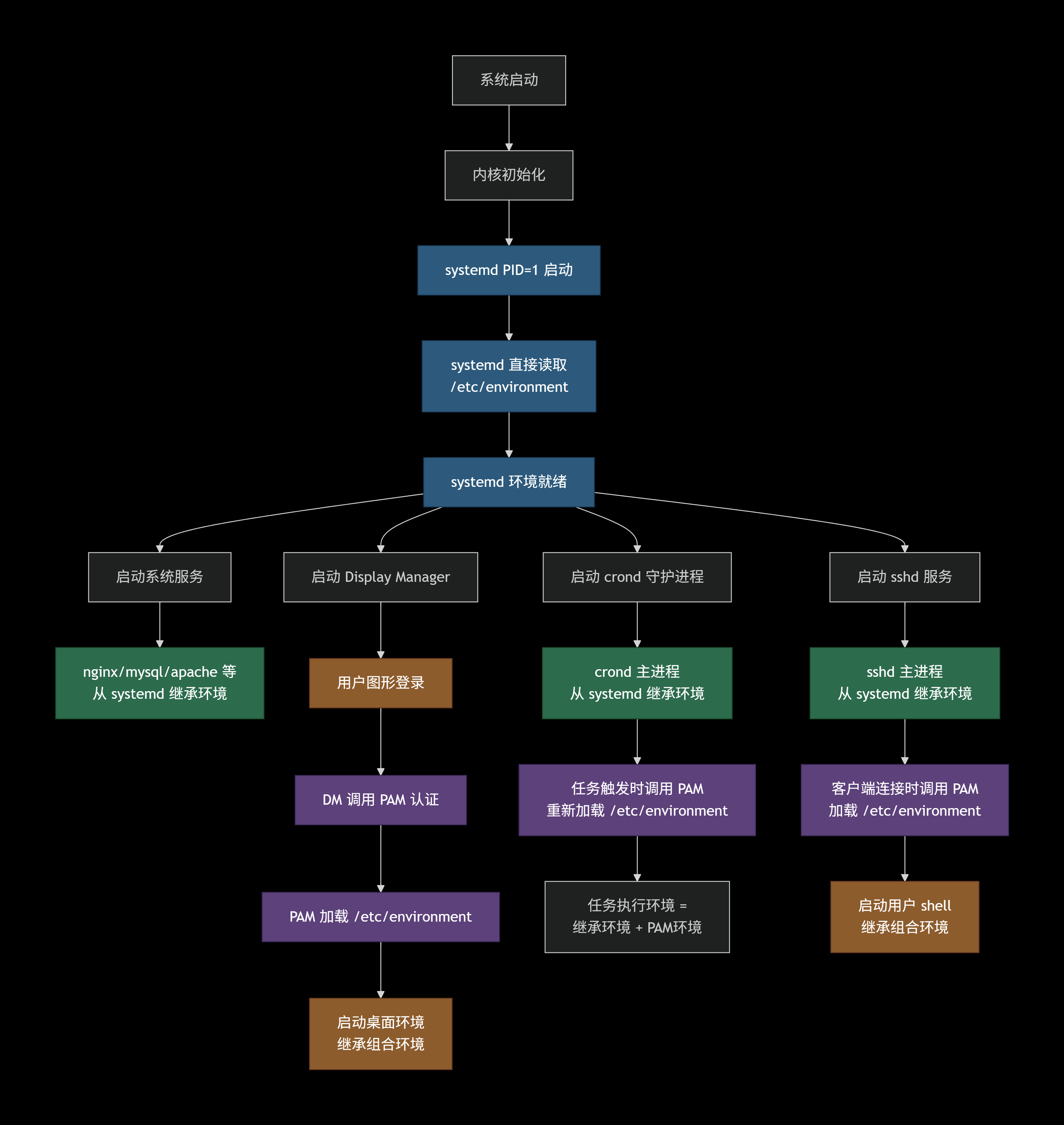
通过这张图还想说明另一件事:本文上面大篇幅讨论的诸如
/etc/profile、~/.profile等文件只是shell的配置文件,其它进程是不会加载它们的,除非其进程内部主动启动了一个shell或者有其它未知的特殊情况。比如,crontab不是shell,其本身吃不到shell配置文件环境,若其执行shell脚本,则启动的shell将继承其环境,而该shell又是一个Non-Interactive Non-Login Shell,启动时也不会加载配置文件,这些都将使得该shell在执行时处于一个十分有限的环境,这意味着在使用crontab定时执行shell脚本时,于shell配置文件中设置的环境变量将不可见,此时不妨把要使用的环境变量直接写死在脚本里。
/etc/rc.d/
/etc/rc0.d/, /etc/rc1.d/, ... 系列目录属于SysVinit体系的组成部分,目录中是软链接,链接指向 /etc/init.d/ 下真正的脚本。SysVinit是旧的初始化系统,现已被systemd兼容并取代。
(DeepSeek)以往没有systemd时,第一个进程是 init,它可能会加载一些自己的配置文件,但不会加载 /etc/environment,然后执行对应运行级别的rc脚本(启动的shell是 Non-Interactive Non-Login Shell),进而启动各项系统服务、守护进程等程序。
(DeepSeek)systemd能够兼容SysVinit,它能够为 /etc/init.d/ 下的脚本生成systemd自身的unit文件,进而执行 /etc/init.d/ 下的脚本。
(另)service 命令其实是一个shell脚本,如果系统使用SysVinit,它(service nginx start)就相当于 /etc/init.d/nginx start;如果系统使用systemd,它就相当于 systemctl start nginx.service。
配置文件角色定位
/etc/profile:shell的系统级配置,Login Shell的系统级配置入口,其中一般会加载/etc/bash.bashrc,遍历/etc/profile.d/。/etc/bash.bashrc:bash的系统级配置,Interactive Shell的系统级配置,用于配置所有用户通用的命令提示符样式、命令别名等。/etc/profile.d/:存放Login Shell系统级配置脚本的目录,常用于配置系统级环境变量。~/.bash_profile:bash的用户级配置,Login Shell的用户级配置入口,其中一般会加载~/.bashrc。该文件(~/.bash_profile)可用于配置用户级环境变量。该文件是bash专用的配置文件,在需要为bash提供专有配置且其它shell继续使用~/.profile配置时才会派上用场,一般很少使用。bash会按照~/.bash_profile > ~/.bash_login > ~/.profile的优先级顺序仅加载存在且可读的第一个文件。~/.bash_login:bash的用户级配置,Login Shell的用户级配置入口,其中一般会加载~/.bashrc。该文件(~/.bash_login)可用于配置用户级环境变量。该文件是bash专用的配置备用文件,功能与~/.bash_profile类似,平时极少使用。bash会按照~/.bash_profile > ~/.bash_login > ~/.profile的优先级顺序仅加载存在且可读的第一个文件。~/.profile:shell的用户级配置,Login Shell的用户级配置入口,其中一般会加载~/.bashrc。该文件(~/.profile)常用于配置用户级环境变量。bash会按照~/.bash_profile > ~/.bash_login > ~/.profile的优先级顺序仅加载存在且可读的第一个文件。~/.bashrc:bash的用户级配置,Interactive Shell的用户级配置,用于配置当前用户的命令提示符样式、命令别名等。~/.bash_logout:bash的用户级配置,Login Shell的用户级配置,用于在退出shell(Ctrl+D或exit触发)时执行一些当前用户的操作,如清理操作。/etc/bash.bash_logout:bash的系统级配置,Login Shell的系统级配置,用于在退出shell(Ctrl+D或exit触发)时执行一些所有用户通用的操作,如清理操作。一般很少使用该文件。/etc/environment:PAM认证模块的系统级配置,也被systemd直接加载,只能用于配置环境变量,在现代使用systemd的linux中,理论上所有进程都能吃到该环境,不过一般很少使用。~/.pam_environment:PAM认证模块的用户级配置,只能用于配置环境变量,但基本已被弃用。/etc/rc.d/:/etc/rc0.d/, /etc/rc1.d/, ...系列目录是SysVinit体系的组成部分,其内存放服务管理脚本的软链接,链接指向/etc/init.d/。SysVinit现已被systemd兼容并取代。/etc/init.d/:SysVinit体系的组成部分,其内存放服务管理脚本。